TL;DR
What's a real VPN?
Every time I'm seeing one of these VPN ads I throw up in my mouth a little. They're either proxies or relays in my opinion. Because for me, these two things are not solving the same problem, no matter what their name suggests.
These "VPN" services
I'm talking about the services that you often see advertising via Youtubers and influencers, touting that they will "protect you" and your privacy.
Some of their claims are wild - like "Your ISP can't see what you're doing if you're using BullshitVPN!" which is true but why is that beneficial? Because what they don't say: Now they can see it. Of course, pinky-promise, no take-backsies, they won't. Trust me bro. No, really, no cap, ngl, bro.
Of course, they say, this is great if you're on an open WiFi. I dunno about that, either. First of all: Most "public WiFi" networks I've seen actually do encrypt traffic, so the attacker needs to be in the same WiFi. Not a big hurdle, because they might just ask for the WiFi password in the same cafe I sit in at the moment, or they're in the same hotel as I am. But then most of my traffic is TLS encrypted anyway - whenever you go to "https://..." you're opening a tunnel to that server. Sure they can see which websites you're visiting but not what you do there. Maybe you want that secret, too, then the VPN might actually help you.
But effectively all they do is encrypt your traffic on your device, send this encrypted traffic to their servers and then exit to the public internet from there.
So they, themselves, become a very lucrative target. Because while I can only see which websites people visit in my hotel or in the same cafe as I am currently logged into, I could see a lot of people's traffic if I got into one of these VPN service servers. I could see many, if not almost all, their user's traffic. It would still be encrypted in the case of things like HTTPS, SMTPS, etc. but hey, it bundles many users in a "single" (not really, they probably have a bunch of exit nodes) point.
But either way - I'd call that a relay. You send your traffic there, it exits to the public internet from that place instead of the network you're currently connected to. That's useful if you're dealing with country restrictions and such. Looking at you, streaming providers.
An actual VPN
This is what VPN means to me: I can connect multiple machines to each other as if they were on a private network, through the means of a public network. A good example is: Can I transfer a file between two devices over internet without risking leaking it to the public or other people on the network?
An SSH tunnel, for example, qualifies.
$ scp secret.txt martin@remote-machine:/home/martinThis will send secret.txt to my home directory on the remote-machine device through an encrypted tunnel.
As far as I know, I can't do that through the VPN services, like CardinalDirectionVPN or EnhancedVelocityVPN et. al.
Why would I want a real VPN?
The real power of a VPN is that the ends of the tunnel can be entire networks rather than just a single machine. What would that be good for?
Connecting networks across locations
The classical example is a company with two office locations.
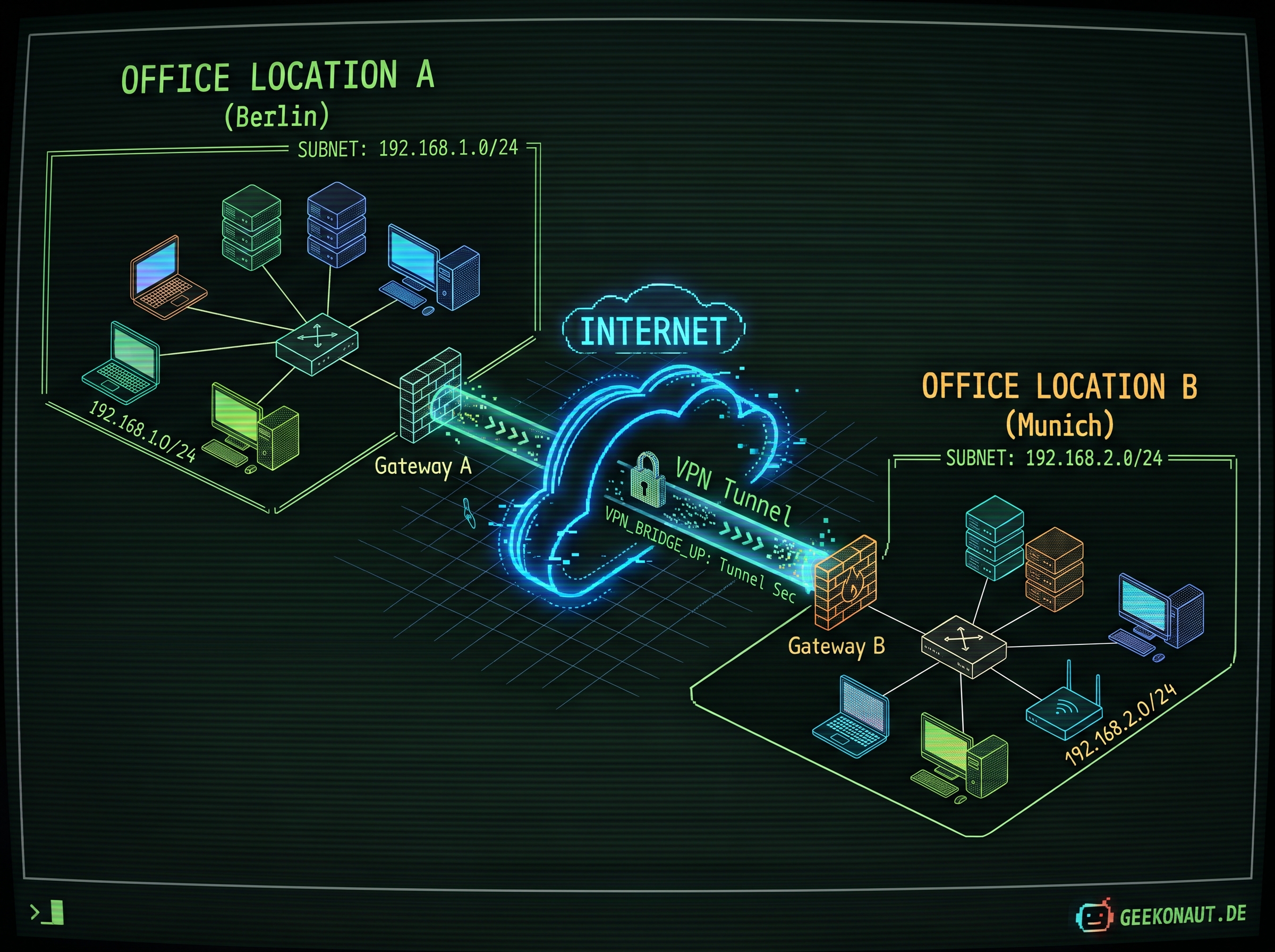
Let's say we have a file server where we keep our contracts and invoices and such. This server sits in the Berlin office and has the local IP 192.168.1.100. As long as I'm working from the Berlin office, I can just access these files without a problem.
But whenever I am in the Hamburg office, I'll be on the 192.168.2.x network and I can't access the file server at all. That's annoying.
So either on a machine within the network or on the routers that connect these networks to the internet, we can set up a VPN tunnel endpoint, aka a VPN server. It's basically a program that runs (on the aforementioned machine or on the router itself) and exposes a network service (like a webserver would do, but this isn't for HTTP connections but for VPN connections).
We do that on both office networks and point them at the other VPN endpoint to establish the connection. The VPN servers talk to each other and will then also have to forward network traffic from the VPN to the local network and vice versa.
Let's say I'm on the network in the Hamburg office. My laptop has the IP address 192.168.2.10 and the file server still is at 192.168.1.100. You can see that we're not on the same network, but the routing configuration is set up so that whenever I access 192.168.1.xxx the traffic goes to the VPN server in the Hamburg network. It then sends the traffic through the VPN tunnel and it appears on the other end (the Berlin office network), where it looks like it's coming from the VPN server in the Berlin network. Any response traffic is transferred back through the tunnel and arrives at my laptop.
That's why I can then access the file server in the Berlin office network while working from the Hamburg office network. Hurrah!
Connecting a single host to a private network
Another common example is having a private company network and accessing it while being on the road. In that case you have someone who's using public networks (either directly connected to the internet or via a hotel network or something similar) using an encrypted tunnel to basically appear as if they're on the private office network.
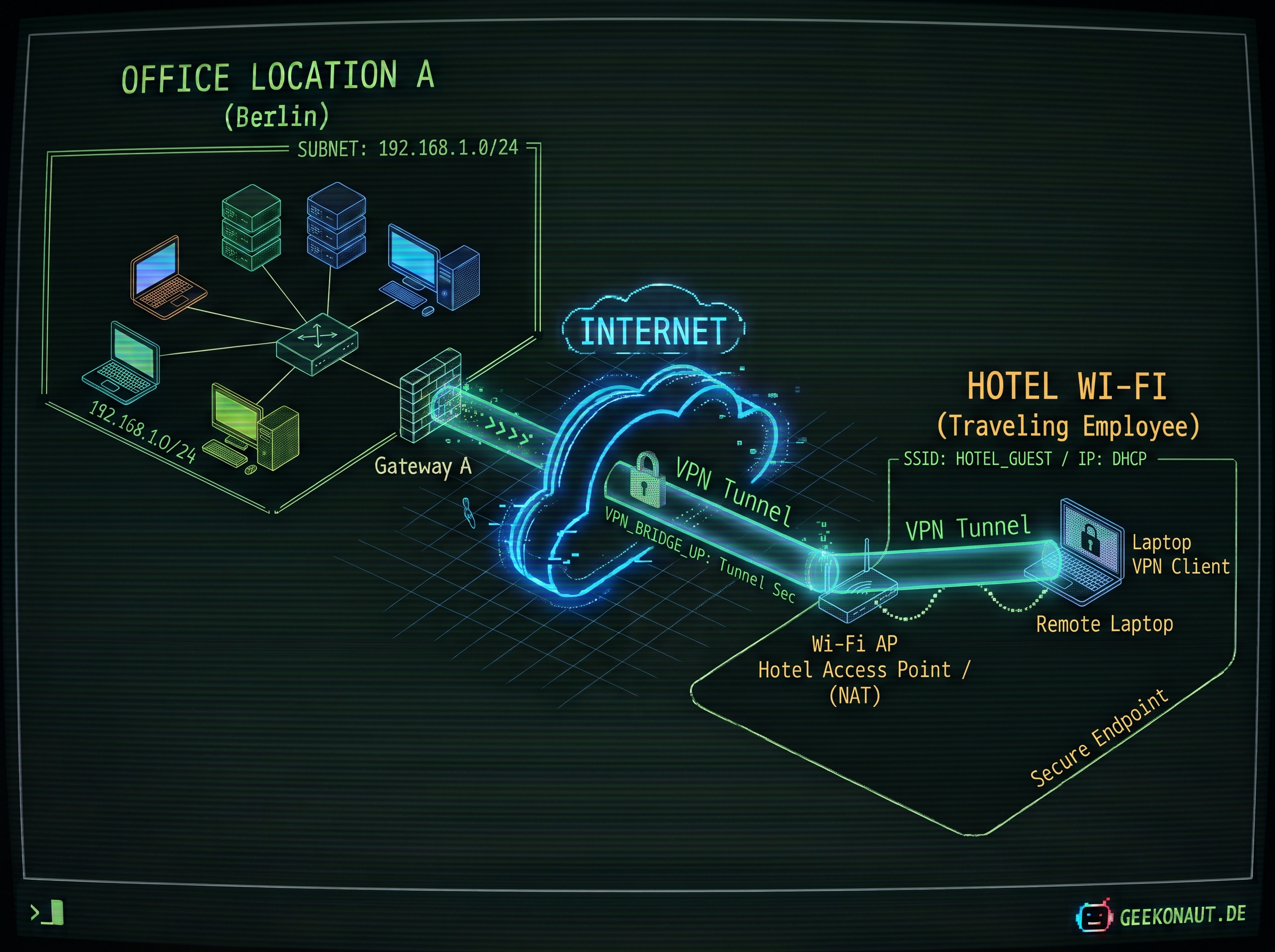
It behaves pretty much the same way as connecting two networks with each other. The difference is that a single machine connecting to a VPN usually runs a VPN client, as no more routing needs to happen. Wireguard doesn't make a difference between servers and clients, because it treats everyone on the VPN the same way.
My practical use case
For me, the use case is relatively simple. I am hosting my photos on my private Immich server. That's a little low-power computer that is hooked up to my home network and I can access this from the browser or the mobile app.
I could put that on the internet, but I don't want to. Only my wife and I use it, nobody else has to connect to it, so I won't hook it up to the internet just for that. But then, we can only access this if we're at home. Bah.
I have a few other things running on my home network that would be nice to access from afar - and again: It's only people within the family who're going to access this - so I don't want to connect these things to the internet. And again: We might want to have access to these things from afar.
So: A VPN is needed! Let's set one up :)
VPN architecture choices
Our home router is a cheap piece of shit, so it doesn't have a VPN server built in. I could get a new router but it works well and I don't want to tinker with that (yet). So, different idea.
Many many moons ago, I used IPSec and OpenSwan and both were a nightmare to set up. Many other moons ago, I used tinc but that was relatively slow and the project seems mostly abandoned nowadays. So I turned to wireguard - the thing almost everyone seems to agree on for VPNs.
Wireguard is indeed surprisingly nice and easy to work with. If you ever set up networking on a linux device, it feels just like that. It effectively creates a virtual network device, configures it with a simple config file and the rest is done as if you're dealing with a real network device: routing, ip address management, firewall rules... it's all the same.
Peer to peer
In Wireguard, there's no server and client, just peers connecting to each other. That's actually pretty neat.
Every participant (peer) in our VPN gets an address on the VPN we're creating (let's say 10.0.0.x).
Our laptop might have an IP within the hotel WiFi (for example 192.168.1.10) and once it joins our VPN, it also has a second IP (for example 10.0.0.2). If our mobile device, which is in the VPN as well, wants to talk to the laptop, it can use 10.0.0.2 to do so.
Basically, both the laptop and the mobile device start Wireguard with a configuration that gives them an IP (10.0.0.x) and they both need a way to authenticate each other - otherwise our tunnel wouldn't be very private if anyone can join. To do so, Wireguard comes with a program (wg) to generate a key pair:
$ wg genkey | tee privatekey | wg pubkey > publickeyThis will create a pair (the files called privatekey and publickey). The private key should never leave the machine it belongs to, the public key can (and has to). We will use the public key to make ourselves known to the other peers in the network.
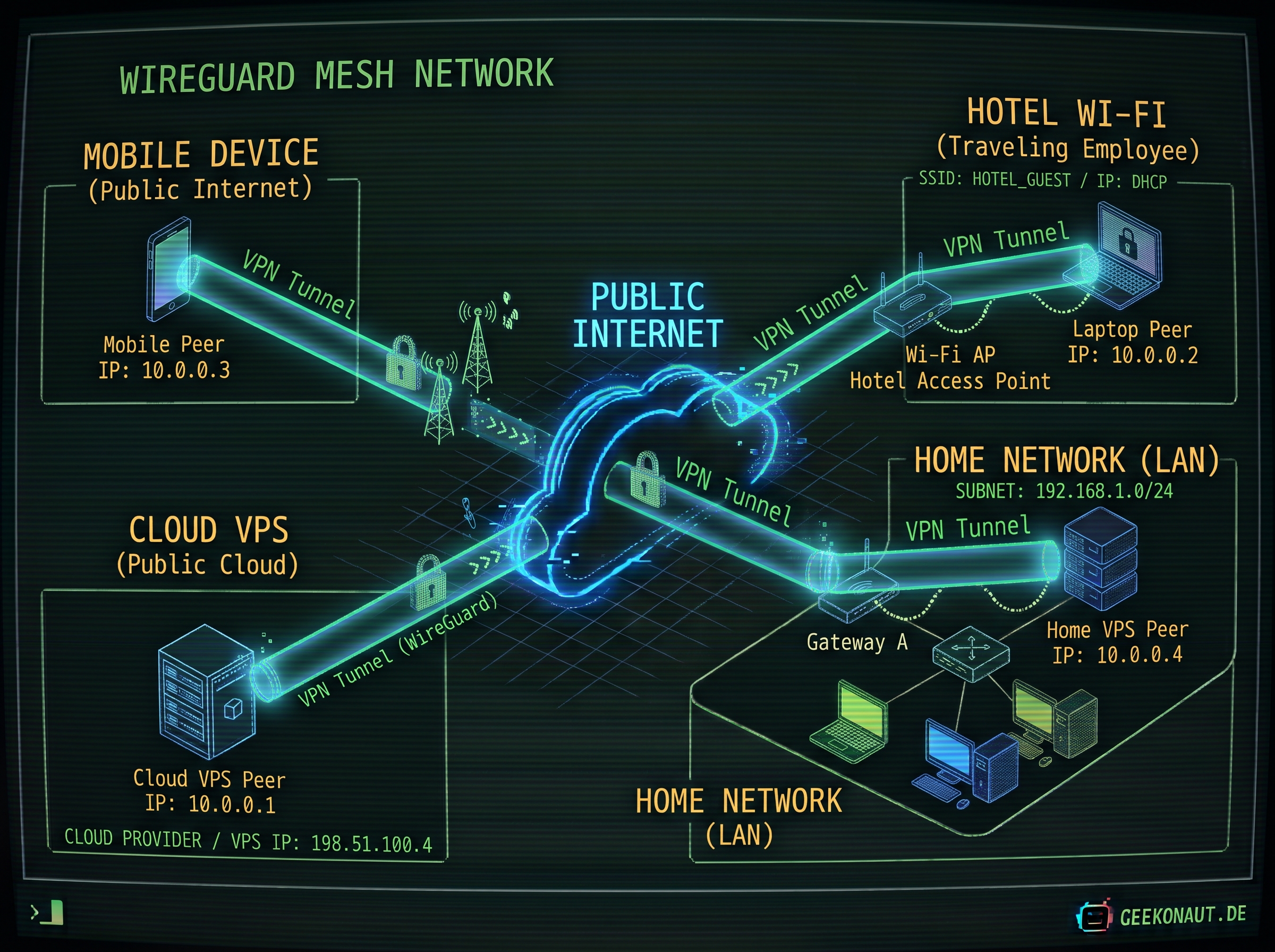
This would be a peer-to-peer architecture but it won't be so easy to make it work properly.
- the mobile device will have to deal with a frequently changing IP, provider-level firewalls and CGNAT issues.
- the laptop will have a similar problem and these hotel networks usually also employ firewalls or NAT which will likely cause problems there, too.
- the home network might need dynamic DNS if its IP changes dynamically and depending on the ISP might also experience CGNAT issues.
Hub and spoke
So, there is an alternative architecture: Hub and spoke. We're having a server which is always online. It lives in the cloud and it has a static IP address. Let's use that as the central hub, through which all the other peers find and connect to each other.
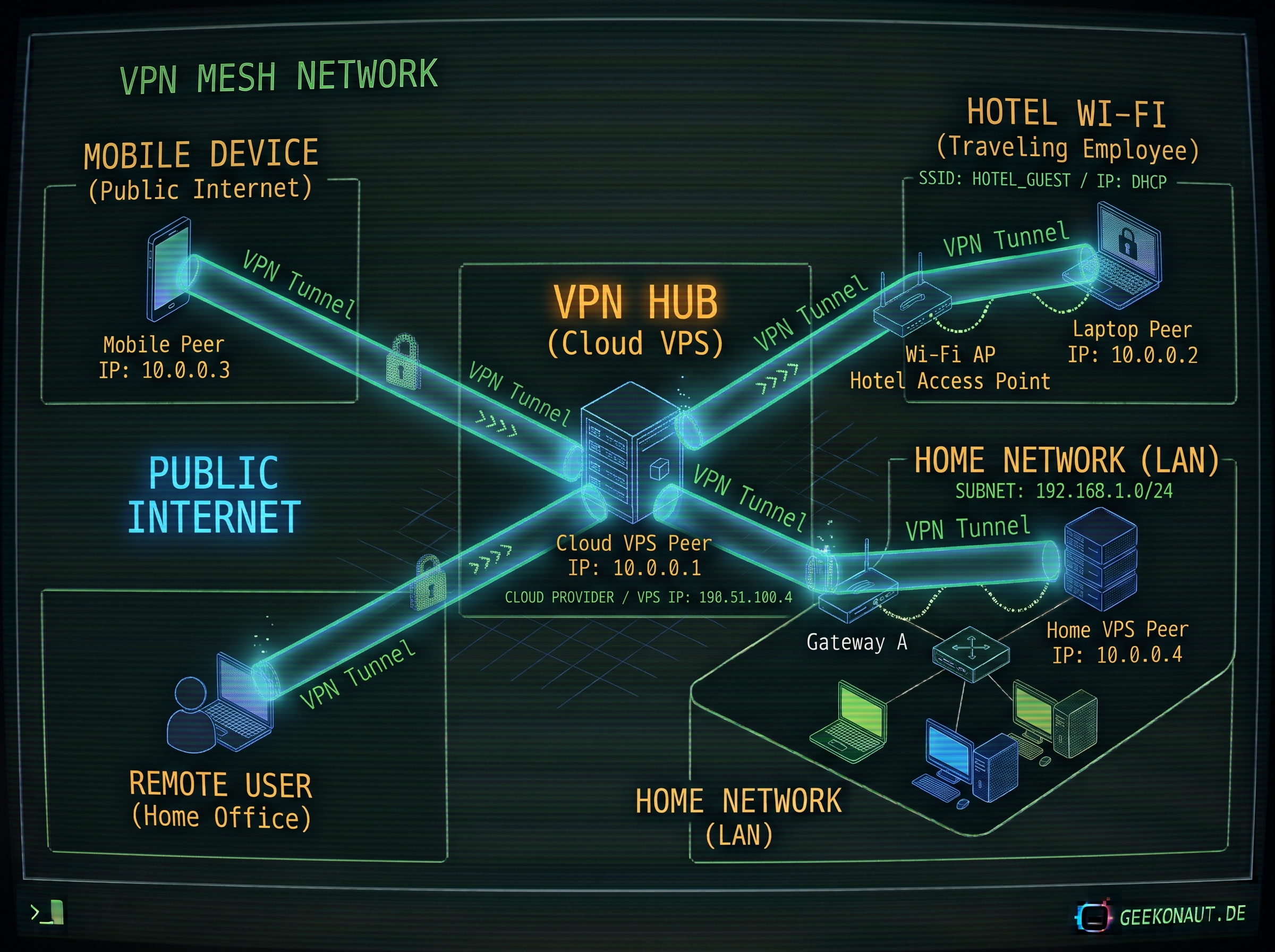
Let's set up the hub
Depending on your operating system, you start by installing Wireguard, then generate your keys as pointed out before in this article. Last but not least, we'll configure our first peer, the hub.
Create or adjust /etc/wireguard/wg0.conf like this:
[Interface]
ListenPort = 34562
PrivateKey = <content from your privatekey file>
Address = 10.0.0.1/24
If your hub is behind a firewall, set it up so it opens UDP via port 34562.
With that configuration, we're giving the hub the IP 10.0.0.1 in the network 10.0.0.x.
I'm lazy, so I'll use wg-quick to get our VPN running on the hub:
$ wg-quick up wg0Let's check if it's up and running:
$ wg show wg0
interface: wg0
  public key: somekey
  private key: (hidden)
  listening port: 34562
It's not really useful yet, because a network with a single machine isn't going to help us much.
Adding a few peers
Let's set up a few peers. On every peer, we'll install wireguard (there are mobile apps, too) and create a configuration like this:
[Interface]
ListenPort = 34562
PrivateKey = <content from your privatekey file>
Address = 10.0.0.2/24

[Peer]
PublicKey = <Public Key from the hub>
Endpoint = <public IP of our hub>:51820
AllowedIPs = 10.0.0.0/24
For each device that is joining the VPN, we will have to change the Address to something unique on the VPN, but otherwise, that's it.
On the hub, we add the peer for each device, too:
[Interface]
ListenPort = 34562
PrivateKey = <content from your privatekey file>
Address = 10.0.0.1/24

# Laptop
[Peer]
PublicKey = <Public Key from this peer>
AllowedIPs = 10.0.0.2/32

# Mobile phone
[Peer]
PublicKey = <Public Key from this peer>
AllowedIPs = 10.0.0.3/32
Basically, with each new peer, we'll just add a [Peer] block that tells our hub which peer holds which IP address, so it knows how to route the traffic. Whenever we add a peer to the hub, we gotta reload the configuration:
$ sudo wg syncconf wg0 <(wg-quick strip wg0)And the peers should show up:
$ wg show wg0
interface: wg0
  public key: <hub key>
  private key: (hidden)
  listening port: 34562

peer: <peer key>
  endpoint: <censored>:17054
  allowed ips: 10.0.0.2/32
  latest handshake: 49 seconds ago
  transfer: 1.38 MiB received, 416.50 KiB sent

peer: <peer key>
  endpoint: <censored>:51983
  allowed ips: 10.0.0.3/32
  latest handshake: 5 days, 16 hours, 56 minutes, 54 seconds ago
  transfer: 1.13 MiB received, 8.34 MiB sent

...
If you want to see your VPN working, you can try pinging hosts on the VPN. Let's say we're on the peer with the address 10.0.0.3, we should be able to do this:
$ ping 10.0.0.1
PING 10.0.0.1 (10.0.0.1) 56(84) bytes of data.
64 bytes from 10.0.0.1: icmp_seq=1 ttl=63 time=27.3 ms
64 bytes from 10.0.0.1: icmp_seq=2 ttl=63 time=24.7 ms
64 bytes from 10.0.0.1: icmp_seq=3 ttl=63 time=29.8 ms
64 bytes from 10.0.0.1: icmp_seq=4 ttl=63 time=28.7 ms
The same should work for any other connected peer on the VPN.
Using our hub as a relay, too
So far, we've set up our hub and a few peers. But what if, like with the "VPN services", we want to use our hub as a relay, so all our traffic goes through the tunnel and enters the public internet through the hub, instead of coming straight from us?
Well, then we need to set up routing so all traffic gets forwarded to the public internet on the hub and set up our peer, so it routes all traffic through the hub.
Let's start on the hub. First things first, we need to add a bit of firewall work in our wg0.conf:
[Interface]
ListenPort = 34562
PrivateKey = <content from your privatekey file>
Address = 10.0.0.1/24

PostUp = iptables -A FORWARD -i wg0 -j ACCEPT; iptables -t nat -A POSTROUTING -o eth0 -j MASQUERADE
PostDown = iptables -D FORWARD -i wg0 -j ACCEPT; iptables -t nat -D POSTROUTING -o eth0 -j MASQUERADE

...
This part of the [Interface] session does a few things:
- Forward packets from
wg0(the VPN) instead of dropping them - Do network address translations (NAT) and pretend the packet came from our internet interface (
eth0), so the internet sees the packet as if it came from the hub directly
The PostUp happens when the VPN goes online, the PostDown happens when it goes offline. The offline removes the forwarding and NAT masquerade again.
It's useful to make sure that the kernel configuration for packet forwarding is enabled:
$ sudo sysctl -w net.ipv4.ip_forward=1Now on the peer, we need to change our config, so all traffic goes through the tunnel, so we change the [Peer] section:
[Peer]
PublicKey = <Public Key from the hub>
Endpoint = <public IP of our hub>:51820
AllowedIPs = 0.0.0.0/0
See that last line? It routes any address through this peer (the hub) now. All our network traffic will go through the VPN and enter the public internet from our hub whenever we're connected to the VPN.
Connecting our home network
Ok that's all nice and fine, but how do we now access our home network and all the machines within it via VPN? That's the next step.
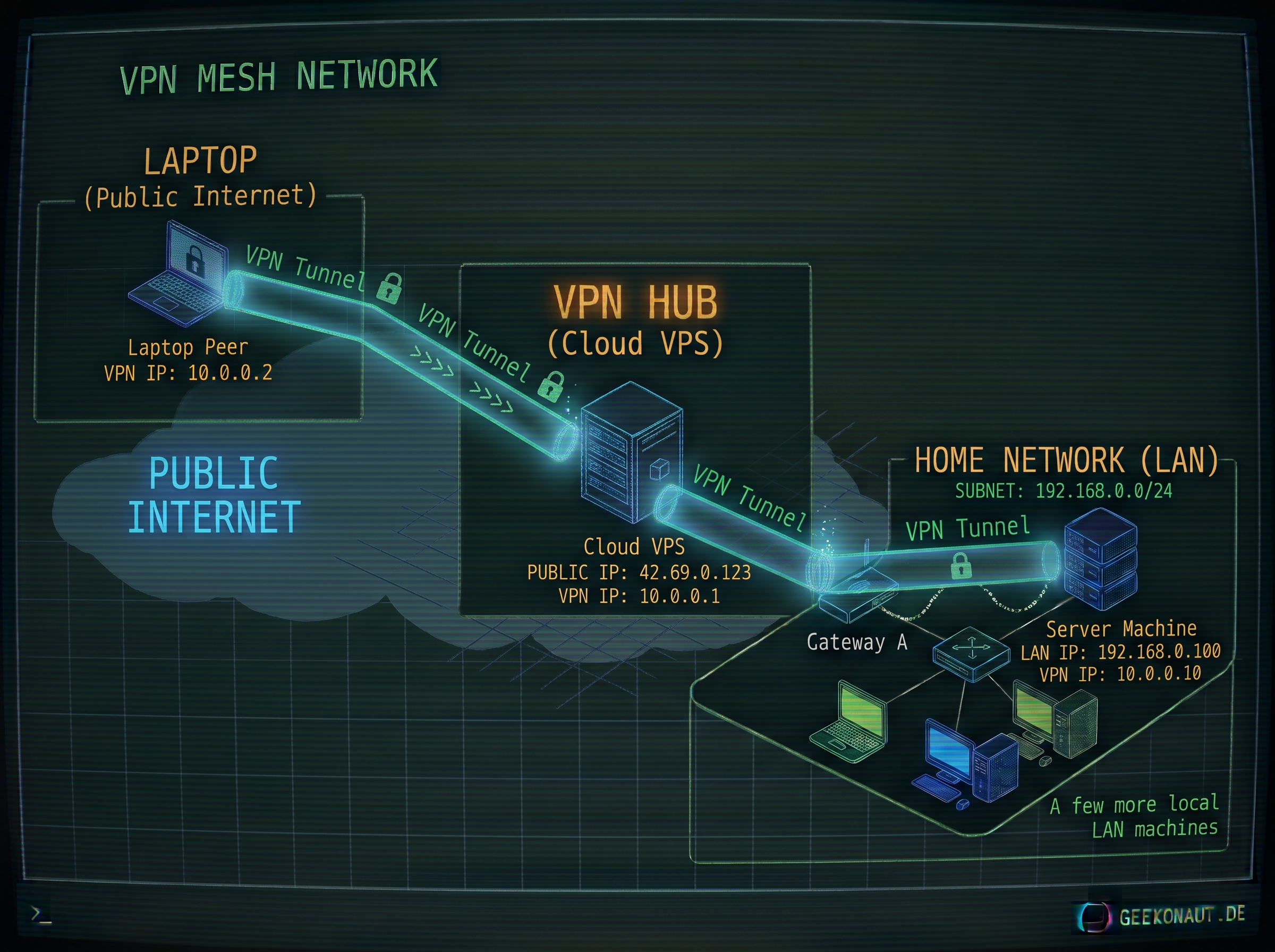
Let's say our setup looks like this:
- Our home network is
192.168.0.1/24 - Inside the network is a VPN peer with the local IP
192.168.0.100and the VPN IP10.0.0.10- we will call this peer our VPN jump host. - Our VPN hub has a public IP of
42.69.0.123and the VPN IP10.0.0.1 - Our remote peer (the laptop) has the VPN IP
10.0.0.2. It's public IP keeps changing, so we don't care about that.
We want to be able to access services inside our 192.168.0.1 home network.
To do that, we need to adjust two parts:
- The hub's configuration for the VPN jump host, so it knows to route traffic to
192.168.0.1/24through this peer - The VPN jump host's setup, so it forwards packages, does NAT and routes traffic to the home network.
Let's go!
Setting up the hub for routing
The [Peer] for the jump host needs to allow the home network IP range:
# Jump host
[Peer]
PublicKey = <Public Key from this peer>
AllowedIPs = 10.0.0.10/32, 192.168.0.1/24
This tells the VPN hub to route packages for any machine in the home network to go to this peer, our VPN jump host.
Setting up the jump host for routing
This resembles the setup of our relay a little bit. So we'll set up forwarding:
$ sudo sysctl -w net.ipv4.ip_forward=1And then make sure there's NAT enabled and firewall rules allow forwarding in the [Interface] section:
PostUp = iptables -A FORWARD -i wg0 -j ACCEPT; iptables -t nat -A POSTROUTING -o eth0 -j MASQUERADE
PostDown = iptables -D FORWARD -i wg0 -j ACCEPT; iptables -t nat -D POSTROUTING -o eth0 -j MASQUERADE
And voila: We can now access hosts on the home network when we're connecting through the VPN, as long as our peer setup specifies that traffic goes through the VPN.
So our peers can either setup a [Peer] entry like the hub uses for the jump host (you can copy that verbatim) or we can set up the peers to route all traffic through the VPN, like we did for the relay setup.